From URL to Pixels: What Really Happens Behind the Scenes
A full breakdown of what happens between hitting Enter and seeing a page — DNS lookup, the TCP/TLS handshake, how the request crosses the Load Balancer and Nginx to reach your server, and how the HTML pipeline turns the response into pixels.
You've probably seen this interview question a hundred times: you type a URL into the address bar, hit Enter, and the page shows up "instantly." But that "instantly" is hiding a surprisingly long journey. The browser has to figure out which server the URL actually points to, establish a secure connection with it, send the request over, and then turn whatever comes back into the page you see on screen.
We'll break that journey into three stages. DNS lookup — finding the real IP address behind the URL. Establishing the connection and getting the request into the server — the TCP/TLS handshake, plus how the request passes through waypoints like the Load Balancer and Nginx. And the HTML pipeline — how the browser turns what it receives into pixels on screen.
Stage 1: DNS lookup — finding the real address behind the URL
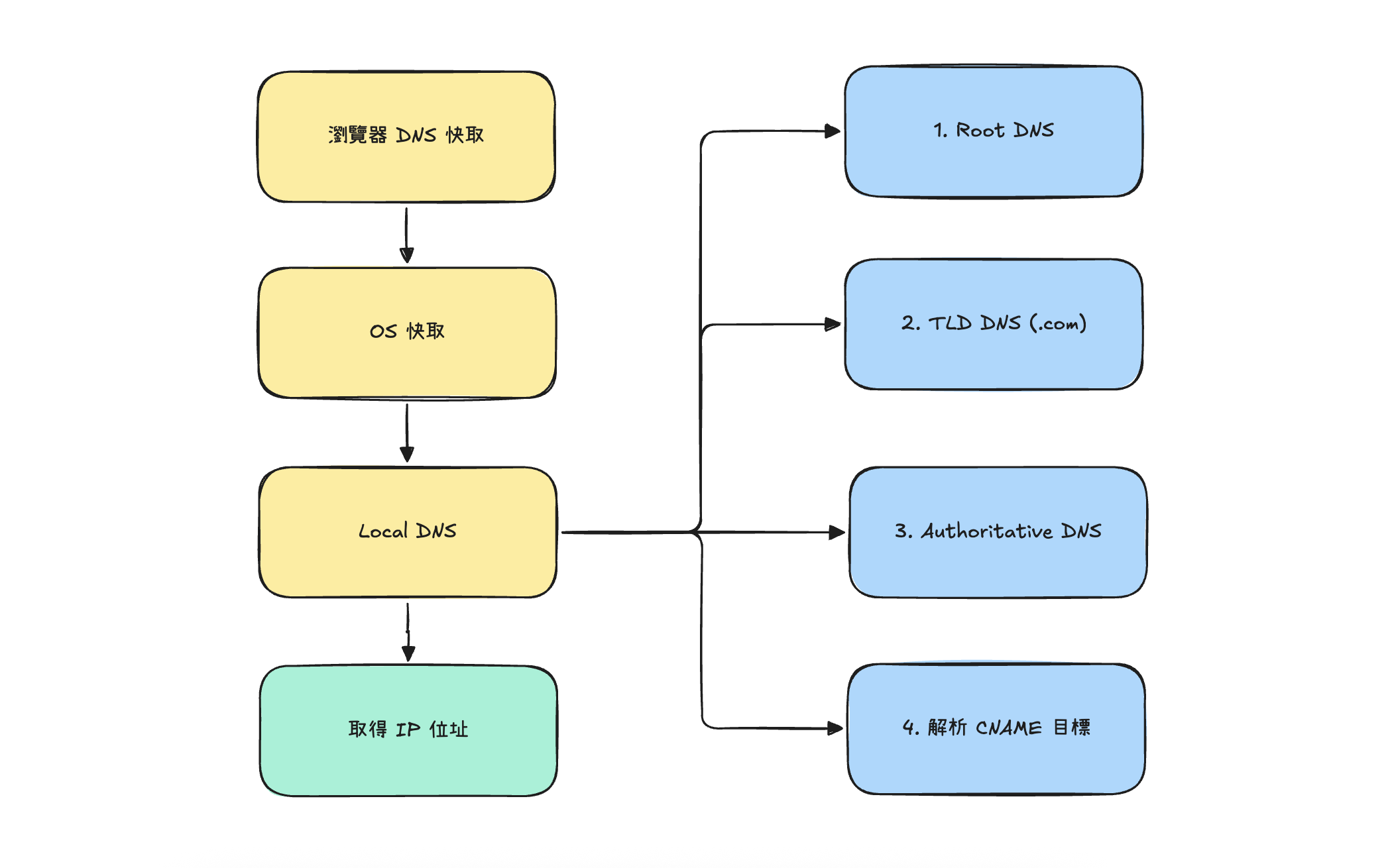
A URL like https://www.example.com means nothing to a computer — computers only understand IP addresses. DNS (Domain Name System) exists to translate that human-friendly URL into an IP address, something like 93.184.216.34.
That translation isn't a single question-and-answer — it's more like a relay race, with each leg handing off to the next if it doesn't have the answer:
- Browser cache: the browser remembers domains it looked up recently. If you just visited the site, it uses the cached result and doesn't even bother asking anyone.
- OS cache: if the browser comes up empty, it asks the operating system. The OS first checks the local hosts file for any manual entries, then checks its own DNS cache.
- Local DNS (recursive resolver): if the OS cache also misses, only then does an actual network request go out — typically to a resolver provided by your ISP, or a public one like 8.8.8.8. This resolver does the legwork of asking around the internet on your behalf and hands back the answer once it finds it; you never see what happens in between. It doesn't necessarily ask these servers one at a time in strict order — depending on the situation, it may query them concurrently:
- Root DNS servers: there are logically only 13 of these worldwide. A root server doesn't know where example.com actually is, but it knows which TLD DNS server to ask for anything ending in
.com, so it hands back that address. - TLD DNS servers: these manage top-level domains like
.com,.org, and.tw, and return the address of the authoritative DNS server responsible for example.com. - Authoritative DNS servers: this is where the real answer lives — usually run by the domain owner or a DNS provider they've delegated to — and it returns the actual IP address for example.com.
- Resolving CNAME targets: if the record it finds is a CNAME (the domain pointing to another domain), the resolver has to take one more hop and resolve that target to an IP address too.
- Root DNS servers: there are logically only 13 of these worldwide. A root server doesn't know where example.com actually is, but it knows which TLD DNS server to ask for anything ending in
Once the local resolver has the IP, it caches the answer along the way according to the record's TTL (Time To Live), then hands it back up to the OS, which hands it back to the browser. The whole lookup can take anywhere from a few milliseconds to several network round trips. And because every layer along the way caches its results, you don't have to redo the full lookup every time you open a page — which is exactly why your second visit to a site is usually faster than the first.
Stage 2: establishing the connection and getting the request into the server
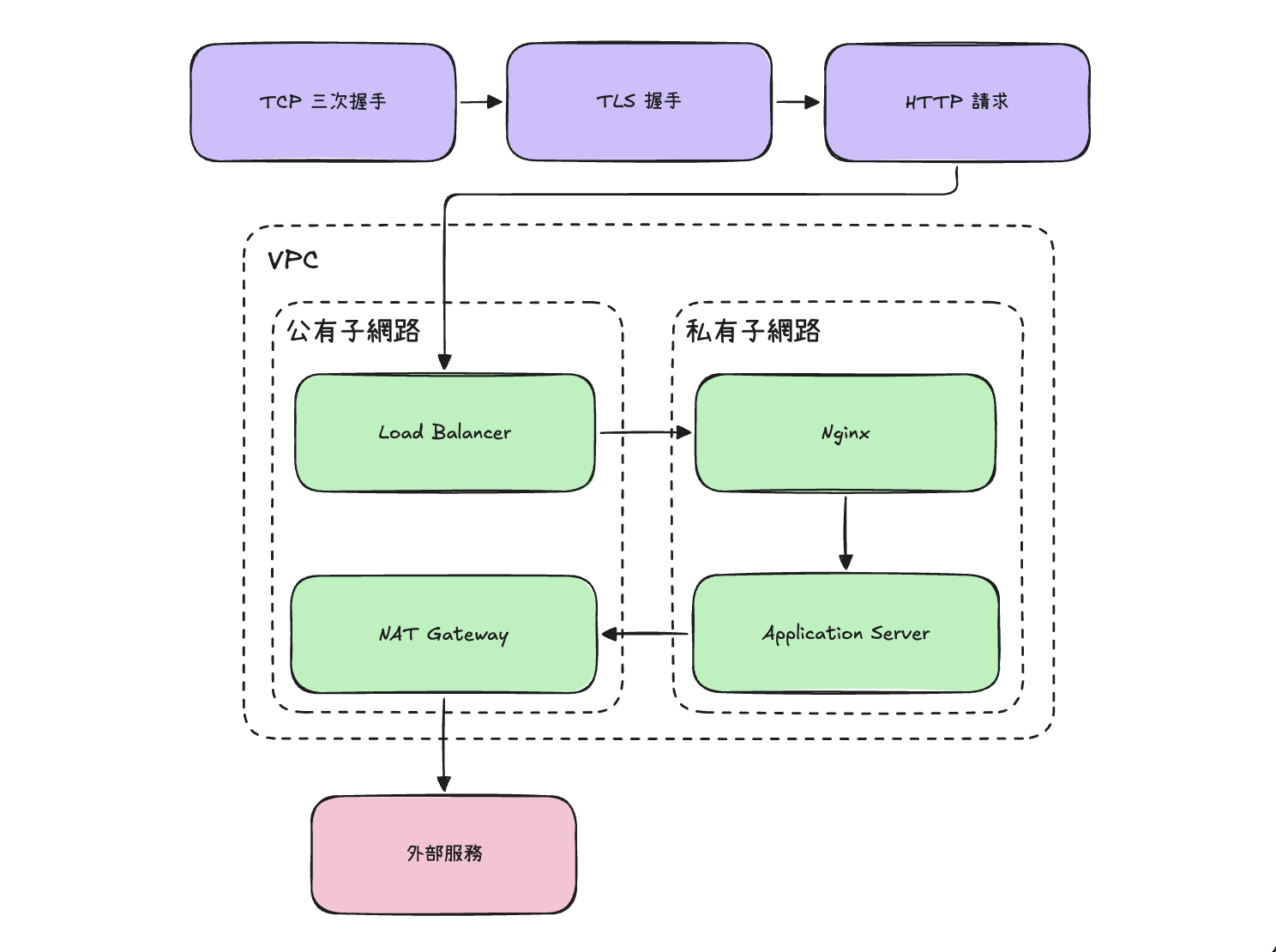
Once the browser has the IP address, it knows where to send data — but it can't just fire off an HTTP request yet. It first needs to "shake hands," making sure both sides are ready and that nothing in between can eavesdrop on or tamper with the conversation.
The TCP three-way handshake: confirming both sides are there
TCP (Transmission Control Protocol) is built for reliability, so before any real data moves, it runs a three-way handshake to confirm both ends are ready:
- SYN: the browser (the client) sends a SYN packet — "I want to open a connection with you."
- SYN-ACK: the server responds with SYN-ACK — "Got it, I'm ready too."
- ACK: the browser sends back an ACK — "Great, let's go."
After that one round trip of three packets, a reliable TCP connection is in place, guaranteeing that data sent afterward arrives in order — and gets retransmitted if it's lost.
The TLS handshake: turning the connection into an encrypted channel
If the URL is https, a TCP connection alone isn't enough — the browser and server also need a TLS (Transport Layer Security) handshake to turn that connection into an encrypted channel, so nothing in the middle can snoop on or tamper with the traffic. Roughly:
- The browser sends a ClientHello, listing which encryption algorithms and TLS versions it supports.
- The server replies with a ServerHello and its digital certificate, proving "I really am the server for this domain."
- Once the browser verifies the certificate is valid, both sides run a key-exchange algorithm to agree on a shared session key that only they know.
- Both sides send a Finished message to confirm the handshake is done — everything after this point is encrypted with that session key.
Add the TCP handshake and the TLS handshake together, and by the time an https connection sends its very first HTTP request, it's already exchanged several round trips of packets with the server. That's why the latency of just setting up a connection often feels more noticeable than transferring the actual data.
Where does the request go once it's sent?
Once the connection is established, the browser can finally send the HTTP request, which looks roughly like this:
GET /index.html HTTP/1.1
Host: www.example.com
User-Agent: Mozilla/5.0
But this request doesn't fly straight into some application running on a server. After crossing the internet and arriving at its destination, it typically lands in a VPC (Virtual Private Cloud) first, then passes through several waypoints in sequence:
- Load Balancer: in the VPC's public subnet, there usually isn't just one server sitting around waiting for this request — it hits a load balancer first. Its job is to spread incoming requests across a whole fleet of backend servers using some algorithm (round robin, least connections, etc.), so no single server gets overwhelmed while others sit idle.
- Nginx, a reverse proxy: the load balancer forwards the request to Nginx, sitting in a private subnet. Nginx might handle TLS termination here (offloading TLS so the internal traffic behind it doesn't need to be encrypted and decrypted again), serve static files, and route or forward requests — passing anything that actually needs dynamic handling on to the application server.
- Application server: this is where the actual business logic lives. Only here does the request truly get processed.
At this point the request has reached the server. Once it's handled, the response travels back through the same waypoints, in reverse, to the browser. And if the application server needs to call an external service during processing — say, a third-party API — since it sits in a private subnet with no public IP, it has to take a different path: through a NAT Gateway, also sitting in the public subnet, which translates its private IP into a public one the outside world can see, so it can reach the external service. The response gets translated back the other way on its way in.
Stage 3: the HTML pipeline — turning the response into pixels
What the server sends back is really just a plain text string of HTML. The browser then has to run it through a render pipeline before it becomes the page you actually see, roughly in these steps:
- Parse HTML → DOM: the browser parses HTML as it receives it into a structured DOM (Document Object Model) tree.
- Parse CSS → CSSOM: at the same time, it processes CSS and works out which styles apply to which nodes, building the CSSOM (CSS Object Model).
- Merge into a render tree: the DOM and CSSOM get merged into the actual nodes and styles that need to be drawn.
- Layout: the browser calculates the exact position and size of every node on screen.
- Paint and composite: each node gets painted into pixels, then composited together in the right stacking order and finally output to the screen.
There's a lot hiding in this pipeline that affects performance — why CSS can block rendering, why a <script> tag can stall HTML parsing, what actually differs between async and defer. We cover all of that in more depth in a separate post, the DOM render pipeline, so we won't repeat it here.
The thing worth remembering: DNS lookup answers "where to go." The TCP/TLS handshake, plus the trip through the Load Balancer and Nginx, answers "how it gets there and back." And the HTML pipeline answers "how what comes back turns into a picture." All three stages are chained together — if any one of them slows down, what we experience is the same thing: a page that feels slow to load.
Wrap-up
Going from typing a URL to seeing a page looks instantaneous on the surface, but the browser is quietly running three stages behind it. First, DNS resolves the URL into an IP address by asking its way up the chain. Then a TCP three-way handshake and a TLS handshake establish a secure connection, letting the HTTP request pass through waypoints like the Load Balancer and Nginx to reach the application server that actually handles the logic (routing through a NAT Gateway too, if it needs to call an external service). Finally, the browser parses, calculates, and paints the HTML response step by step into the page in front of you.