DOM Render Pipeline: From HTML String to Pixels on Screen
A breakdown of how browsers turn an HTML string into pixels on screen, and why some resources block rendering (parser-blocking)
The instant a page loads, all you see is "the page just appeared." But in that fraction of a second, the browser actually runs through a surprisingly intricate pipeline. What the server sends back is nothing more than a plain text HTML string. So how does that turn into the colorful, laid-out, clickable page in front of you?
This post walks through every stage of that "render pipeline," and along the way clears up a term a lot of people think they understand but don't: parser-blocking. Once you get this, questions like "why should this CSS go in <head>" or "why add defer to this <script>" stop being rules you memorize and start being things you actually understand.
The big picture first
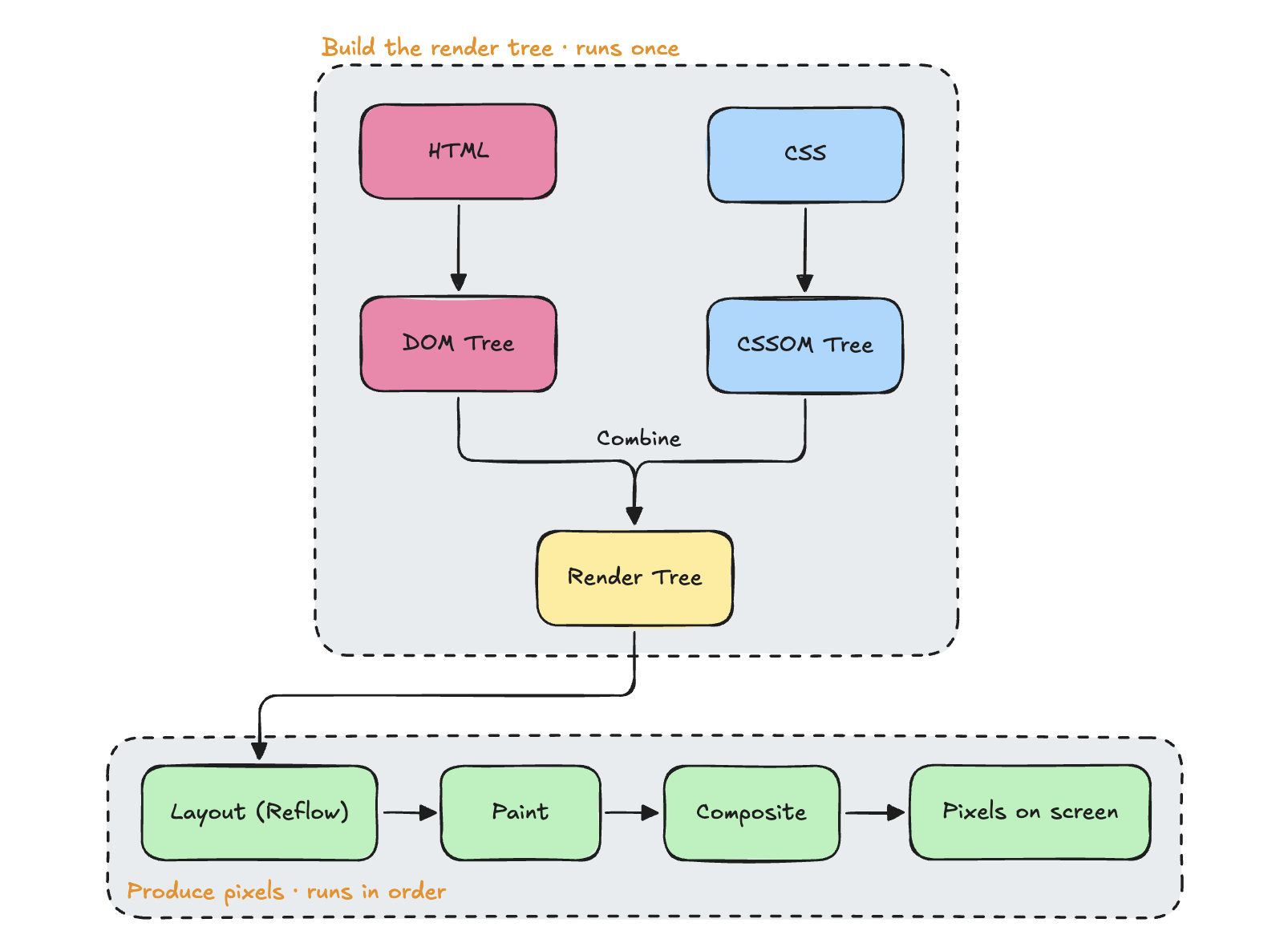
Stage 1: How does HTML become the DOM tree?
What the browser receives is, at bottom, a long stream of bytes. Turning that into a structured DOM tree happens in a few substeps:
- Bytes → Characters: decode the bytes into characters based on the encoding (usually UTF-8).
- Characters → Tokens: the tokenizer scans character by character, recognizing things like
<div>,</div>, attributes, and text content as tokens — this step is a lot like lexical analysis in a programming language. - Tokens → Nodes: each token gets converted into a corresponding object node, so
<p>becomes anHTMLParagraphElementnode. - Nodes → DOM Tree: nodes get attached into a tree structure based on how the tags are nested, eventually growing into the full DOM (Document Object Model).
This whole process is incremental — the browser doesn't wait for the entire HTML file to finish downloading before it starts. The moment data arrives over the network, the parser starts chewing through it. That's why pages tend to render in chunks instead of popping into existence all at once.
Stage 2: Where does the CSSOM come from?
Running in parallel with DOM construction is CSS processing. When the browser hits a <link rel="stylesheet"> or <style> tag, it fetches the CSS and runs it through the same tokenizing and node-construction pipeline, eventually producing a CSSOM (CSS Object Model) tree.
The CSSOM looks a lot like the DOM — both are tree structures — but it tracks something different: what styles apply to each node. And it has a property the DOM doesn't: rules can override each other. A child's computed style often depends on the final value resolved on its parent (an em unit, for instance, needs the parent's font size). That means the CSSOM has to be fully and correctly resolved before it's usable — unlike the DOM, you can't partially use it while it's still being built.
That single property is the key to the parser-blocking problem we're about to get into.
Why is CSS a render-blocking resource?
Short version: by default, CSS blocks rendering, but it does not block HTML parsing itself.
Let's unpack that:
- When the browser hits a
<link rel="stylesheet">, it keeps parsing the rest of the HTML and keeps building the DOM tree — it doesn't stop everything to wait for the CSS to download. - But it also won't paint anything to the screen until the CSSOM is fully built.
Why design it this way? Because if the browser painted the page before CSS finished loading, you'd see an unstyled, bare-bones layout flash on screen before it suddenly snapped into its styled version — the dreaded FOUC (Flash of Unstyled Content). To avoid that jarring flash, browsers take the position of "better to paint late than to paint wrong," deliberately letting the CSSOM block the render tree, which in turn blocks paint.
So strictly speaking, CSS doesn't block the parser — it blocks rendering. That's why the more precise term is render-blocking CSS.
What about JavaScript? That's the real parser-blocker
If CSS blocks the picture, <script> tags cause a more fundamental problem: they pause HTML parsing outright.
The reason is straightforward: JavaScript can modify the DOM using document.write(), appendChild(), and similar APIs, so the browser has no way to know in advance what the DOM will look like after a script finishes running. To guarantee correctness, when the browser hits a plain <script src="..."> tag, it does three things:
- Stops the HTML parser.
- Downloads the script (if it isn't cached).
- Executes it immediately.
- Only resumes parsing the rest of the HTML once the script finishes.
That's what parser-blocking actually means: the parser itself grinds to a halt — it's not just that painting gets delayed, the DOM tree can't even keep growing. If that script is large or the server is slow, you end up staring at a frozen page, which hurts more than the delay CSS causes.
There's an even messier scenario: say a <script> tag comes after a <link rel="stylesheet">, and that script reads style-related properties (say, getComputedStyle()). To return correct results, the browser will wait for the CSSOM to finish building before running the script. In other words: CSS isn't done, so JS can't run; JS hasn't run, so the HTML parser can't resume. Stack those together and you get the classic chain: "CSS indirectly blocks JS, and JS blocks the parser."
Breaking the chain with async and defer
Browsers give you two attributes to tell the parser "this script doesn't need to be waited on":
<script src="analytics.js" async></script>
<script src="app.js" defer></script>async: downloads in parallel with HTML parsing, but the moment it finishes downloading, it interrupts the parser to run immediately, and parsing resumes afterward. Good for scripts that are self-contained and don't depend on DOM order — think ads or analytics.defer: also downloads in parallel, but execution is pushed back until the entire HTML document has finished parsing, right beforeDOMContentLoadedfires — and multipledeferscripts run in the order they appear in the document. This is the safer choice for application scripts that need the full DOM and depend on each other.
One-liner to remember it by: async means "whoever finishes downloading first runs first," defer means "everyone downloads, then they run in order."
If you want a deeper comparison of the two, check out the other post on the difference between async and defer.
Stage 3: How does the render tree get assembled?
Once you have both the DOM and the CSSOM, the browser merges them into the render tree. There's a detail here that's easy to miss: not every DOM node makes it into the render tree.
- Nodes with
display: noneare excluded entirely (visibility: hiddenis different — the element just becomes invisible; it still takes up space and still gets computed). - Nodes that were never meant to be visible, like
<head>and<meta>, don't show up in the render tree either.
Every node that does make it into the render tree carries the fully resolved style information for that element, ready for the next stage: figuring out its actual position and size.
Stage 4: Layout (reflow)
Layout takes every node in the render tree and calculates its actual coordinates and dimensions on screen — x, y, width, height — based on its resolved styles. This happens recursively: a parent's size often determines how a child's size gets calculated. A child set to width: 50%, for example, first needs to know what width its parent resolved to.
There's a performance trap worth flagging here: anything that changes an element's geometry can trigger a new layout pass. Reading and writing properties like offsetHeight or getBoundingClientRect() frequently from JavaScript can cause forced synchronous layout — a well-known hidden landmine in frontend performance work.
Stage 5: Paint
Layout decides where things are and how big they are; paint decides what color goes on every pixel. The browser converts text, colors, borders, shadows, images, and other visual details into actual pixel data, usually splitting the work across multiple layers.
Stage 6: Composite
The final step is combining all those painted layers into the final image, in the correct stacking order (z-index), and outputting it to the screen with GPU acceleration. This is why animating transform and opacity performs so well — the browser can often handle those changes entirely at the compositing stage, without re-running layout or paint.
What does this mean in practice?
Once you understand the whole pipeline, the optimizations fall out naturally:
- Use
asyncfor third-party scripts that are self-contained and don't touch the DOM, so they don't block parsing on the main thread. - Avoid reading and writing geometry properties from JS too frequently, to prevent unnecessary layout thrashing.
- Prefer animating with
transformandopacity, so the browser can stay in the compositing stage and skip the expensive layout and paint work.
Summary
Turning an HTML string into pixels on screen takes a tightly coupled pipeline: HTML parses into the DOM, CSS parses into the CSSOM, the two merge into the render tree, and then layout computes position, paint fills in color, and composite assembles the layers — only then do you get what's on screen. CSS fundamentally blocks rendering, to avoid a visual flash. JavaScript, by default, blocks parsing itself — and gets held up indirectly by CSS along the way.