Kubernetes Under the Hood: How the Control Plane and Node Components Split the Work
A breakdown of the Control Plane components — API Server, etcd, Scheduler, and Controller Manager — plus the Node-side kubelet and kube-proxy, so you can see exactly what happens behind a single kubectl apply.
What Actually Happens Behind a Single kubectl apply?
If you've spent any time with Kubernetes (K8s for short), you've typed a line like this more than once:
kubectl apply -f deployment.yamlHit enter, wait a few seconds, and Pods start popping up like mushrooms after rain — their status flipping from Pending to Running. It looks like magic, but it's really just a handful of independent components working in lockstep. The official docs split them into two groups: the brain running on the Control Plane, and the hands and feet running on every Node.
Once you understand what each layer is responsible for, you'll actually know where to look when a Pod gets stuck in Pending, a Service refuses to connect, or the cluster starts acting weird — instead of just restarting things and hoping for the best.
Control Plane and Node: The Cluster's Brain and Hands
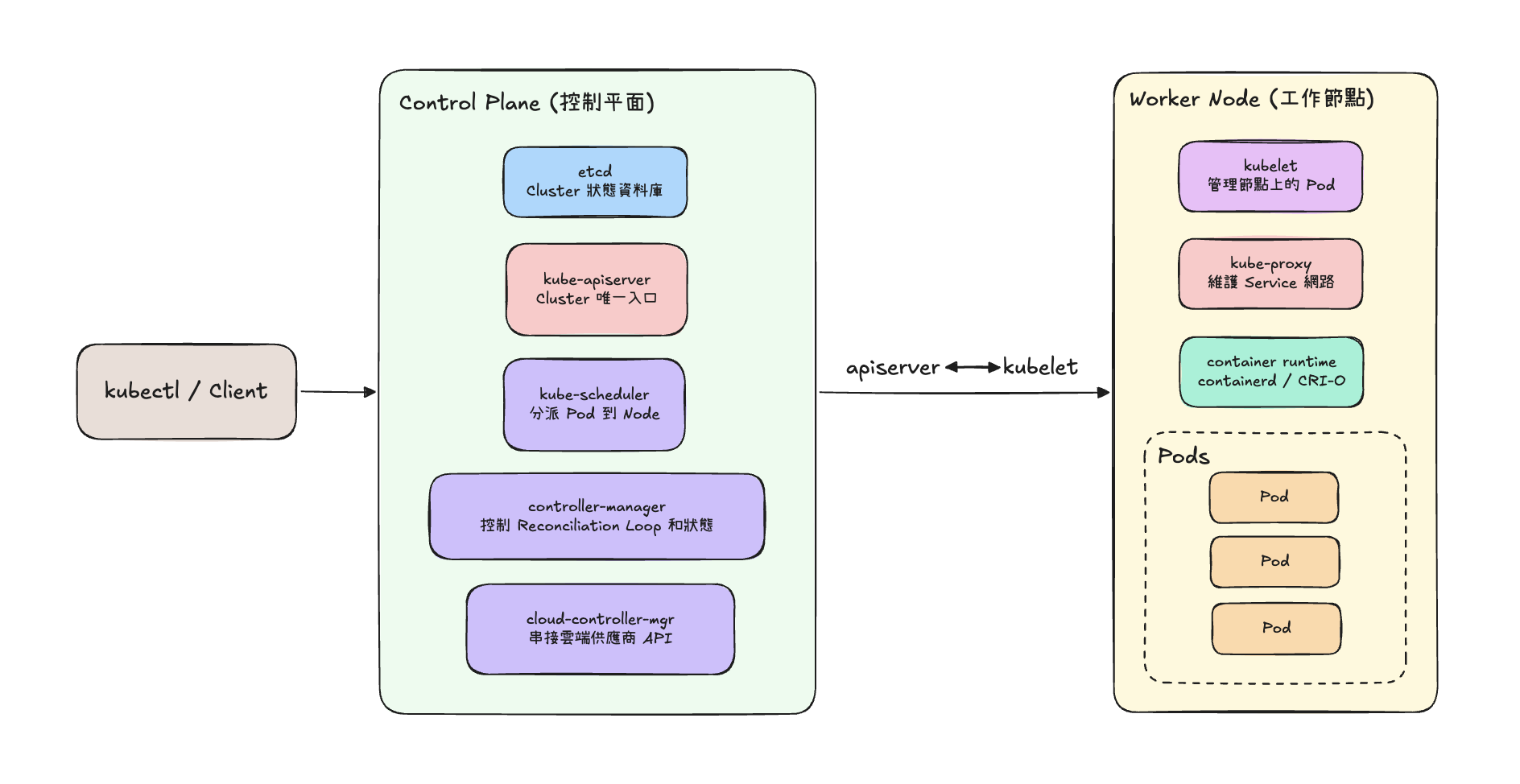
Start with the basic mental model: the Control Plane only makes decisions. It constantly compares the cluster's current state against the state you've declared, then issues instructions. The Node is where execution happens — actually starting containers and wiring up the network is all Node-side work.
- Control Plane: API Server, etcd, Scheduler, Controller Manager.
- Node: kubelet, kube-proxy, and a container runtime (like containerd).
There's one important property to this split: the Control Plane never touches a container directly — it only decides what should happen. The actual doing is always left to the components on the Node. Let's walk through them in the order a request actually flows.
API Server: The Single Front Door for Every Request
That YAML file you send with kubectl apply doesn't land on the Scheduler or etcd first — it lands on kube-apiserver. The API Server is the only door into the entire cluster. Whether it's a manual kubectl command or one component talking to another, everything has to go through it first.
It does three things:
- Authentication and authorization — checking who sent the request and whether they're allowed to do it.
- Validation and admission — making sure the incoming object is well-formed and filling in any necessary defaults (this is Admission Control).
- Reading and writing etcd — persisting the validated object's state to etcd, or reading it back out.
Worth noting: the API Server itself is stateless. It doesn't remember what the cluster looks like — all of that state lives in etcd. That's exactly what makes it easy to scale horizontally: you can run multiple replicas behind a load balancer, and since they're all reading from the same etcd, there's no state to sync between them.
etcd: The Cluster's Single Source of Truth
If the API Server is the front desk, etcd is the filing cabinet behind it — the one place that holds the cluster's entire state. It's what people mean when they call K8s's storage the Single Source of Truth. Every Pod, Service, and ConfigMap definition lives in etcd as a key-value pair.
etcd is a standalone distributed key-value store — it wasn't invented for Kubernetes. It uses the Raft consensus algorithm to keep data consistent across replicas. That's also why production etcd clusters almost always run an odd number of nodes (3 or 5): Raft needs a majority to agree before a write succeeds, and an odd count gives you the best fault-tolerance-to-node-count ratio.
Here's a detail worth remembering: only the API Server ever talks to etcd directly. Even the Scheduler and Controller Manager go through the API Server to check cluster state — they never read etcd on their own. That keeps etcd's access tightly controlled and keeps the whole system's data flow simple.
Scheduler: Deciding Which Node a Pod Belongs On
The moment a new Pod is created without a Node assignment, kube-scheduler picks it up. Its job sounds simple — find the Pod the best Node to run on — but "best" actually comes out of a two-stage process:
- Filtering — rule out any Node that obviously doesn't qualify: not enough CPU or memory, a Taint on the Node with no matching Toleration on the Pod, or a nodeSelector that doesn't match its labels.
- Scoring — score every Node that's still in the running, weighing things like how evenly resources are used and any Affinity/Anti-Affinity rules, then pick the highest scorer.
Once it decides, the Scheduler doesn't actually create anything — it just writes its decision back through the API Server, setting the Pod object's nodeName field in etcd. Actually starting the container is still kubelet's job.
Controller Manager: The Reconciliation Loops That Close the Gap
Kubernetes's core design philosophy is declarative: you just describe the end state you want — "this Deployment should have 3 replicas running" — and leave it to the system to figure out how to get there from wherever it currently is. kube-controller-manager is what makes that happen.
It's not actually a single controller — it's dozens of independent controllers bundled into one process, including:
- Deployment Controller — keeps the ReplicaSet count and version under a Deployment matching what's declared.
- ReplicaSet Controller — keeps the Pod replica count matching what's declared, creating or deleting Pods as needed.
- Node Controller — watches whether Nodes are still alive, and marks a Node's Pods for rescheduling once it's been unresponsive too long.
Every one of these controllers runs the same pattern, called a Reconciliation Loop: read the current actual state, compare it to the declared desired state, take action to close any gap, and repeat — forever.
The biggest payoff of this design is self-healing: no matter what goes wrong — a Node crashing, someone manually deleting a Pod — as long as the reconciliation loop is running, the system keeps nudging things back toward the declared state on its own, with no human intervention needed.
kubelet: The One Actually Doing the Work on Each Node
Everything covered so far — API Server, etcd, Scheduler, Controller Manager — runs on the Control Plane. They only decide things and write state; none of them ever actually starts a container. That's kubelet's job, running on every single Node.
kubelet follows a pattern a lot like Controller Manager — a continuously running reconciliation loop — just scoped down to "which Pods should be running on this particular Node":
- Continuously ask the API Server: "What Pods are assigned to me?"
- Compare that list against the containers actually running on this machine.
- Reconcile any difference by calling the container runtime (like containerd) to start what's missing and kill what shouldn't be there.
- Keep reporting container and Pod health (via Liveness and Readiness Probes) back to the API Server, which writes it to etcd.
In other words, kubelet is the only bridge between what the Control Plane decides and what actually runs. The Scheduler decides "this Pod belongs on Node A" — but calling the container runtime, mounting volumes, and enforcing resource limits on Node A is entirely kubelet's job.
kube-proxy: Turning a Service into Routing Rules
Pods have an annoying quirk: every time one gets deleted and recreated, its IP changes. Tracking a Pod's current IP on every call would be miserable, which is exactly the problem Service solves — it gives a group of Pods a stable virtual IP (ClusterIP) and DNS name, so callers never have to care how many times the Pods behind it have churned.
But a Service is just a declaration. What actually makes "call the ClusterIP and land on the right Pod" work is kube-proxy, running on every Node. It watches the API Server for changes to Services and their Endpoints (the list of Pods matching a Service's selector), and translates that mapping into real network rules on the Node.
Putting It All Together: A Pod's Journey From Declaration to Running
String all these components back together into a timeline, and the whole flow actually makes a lot of sense:
- You run
kubectl apply -f deployment.yaml, and the request hits the API Server. - The API Server validates identity and format, then writes the Deployment object to etcd.
- Inside Controller Manager, the Deployment Controller and ReplicaSet Controller notice a gap between desired and actual state (Pods are missing), and create the right number of Pod objects — written back to etcd, with no Node assigned yet.
- The Scheduler spots the unassigned Pods, runs them through Filtering and Scoring, picks a Node, and writes the result back through the API Server.
- kubelet on the chosen Node notices it's been assigned a new Pod and calls the container runtime to actually start it.
- If the Deployment sits behind a Service, kube-proxy picks up the new Pod's IP and updates the Node's network rules so traffic gets routed to it correctly.
From start to finish, none of the four Control Plane components ever touch a container directly — they just read and write etcd and coordinate decisions. Turning a Pod into a container that's actually running and reachable on the network is entirely the job of kubelet and kube-proxy on the Node.
The Takeaway
Kubernetes's underlying architecture boils down to one sentence: the Control Plane decides what should happen, and the Node makes it happen. The API Server is the one door in and the one data channel; etcd is the single source of truth; the Scheduler decides where a Pod goes; Controller Manager's reconciliation loops keep reality converging on the declared state; kubelet turns those decisions into running containers; and kube-proxy turns the Service abstraction into real network routing rules. Next time a Pod is stuck or a connection is misbehaving, follow this chain — it'll usually point you straight to whether the problem is in the decision layer or the execution layer.