Rendering Long Lists: Why Thousands of Rows Feel Slow, and How Virtualization Works
Start with what too many DOM nodes actually cost in style, layout, paint, and memory, then see how windowing (virtualization) renders only what's visible, and build a fixed-height virtual list yourself.
Your Users Can't See That Much
Say each item is 50px tall and the viewport is 800px. That means only about 16 items are visible at any moment. Yet we built DOM nodes for all 10,000 records, paying more than 600 times the cost to render things the user will never see.
That's the starting point for virtualization: if nobody can see it, don't render it.
How Windowing Works
Virtualization is also called windowing. Picture the whole list as a very long scroll of paper, and the viewport as a window that only lets you see a small slice of it. We only need to draw what's inside the window (plus a little buffer above and below). Everything else never gets created.
To make this trick work, we have to solve three problems.
1. Keep the scrollbar the right size
If we only render 20 items, the container is only 20 items tall, the scrollbar becomes tiny, and scrolling feels broken. So we add a spacer element whose height equals the total height of all the data:
total height = number of items × height per item
Now the scrollbar's length and proportions look exactly as if we had rendered everything.
2. Work out the visible range from the scroll position
Assume every item has a fixed height, itemHeight. The container has scrolled down by scrollTop, and its visible height is viewportHeight. Then:
const startIndex = Math.floor(scrollTop / itemHeight)
const endIndex = Math.ceil((scrollTop + viewportHeight) / itemHeight)
Everything between startIndex and endIndex is what's currently on screen. In practice, you'll usually render a few extra items above and below, known as overscan, so fast scrolling doesn't flash blank space.
3. Put that slice in the right place
We only render the visible items, but they still have to show up where they belong. The usual approach is to push them down with transform: translateY(...) or padding-top, to the offset that matches startIndex:
const offsetY = startIndex * itemHeightHere's the overall structure:
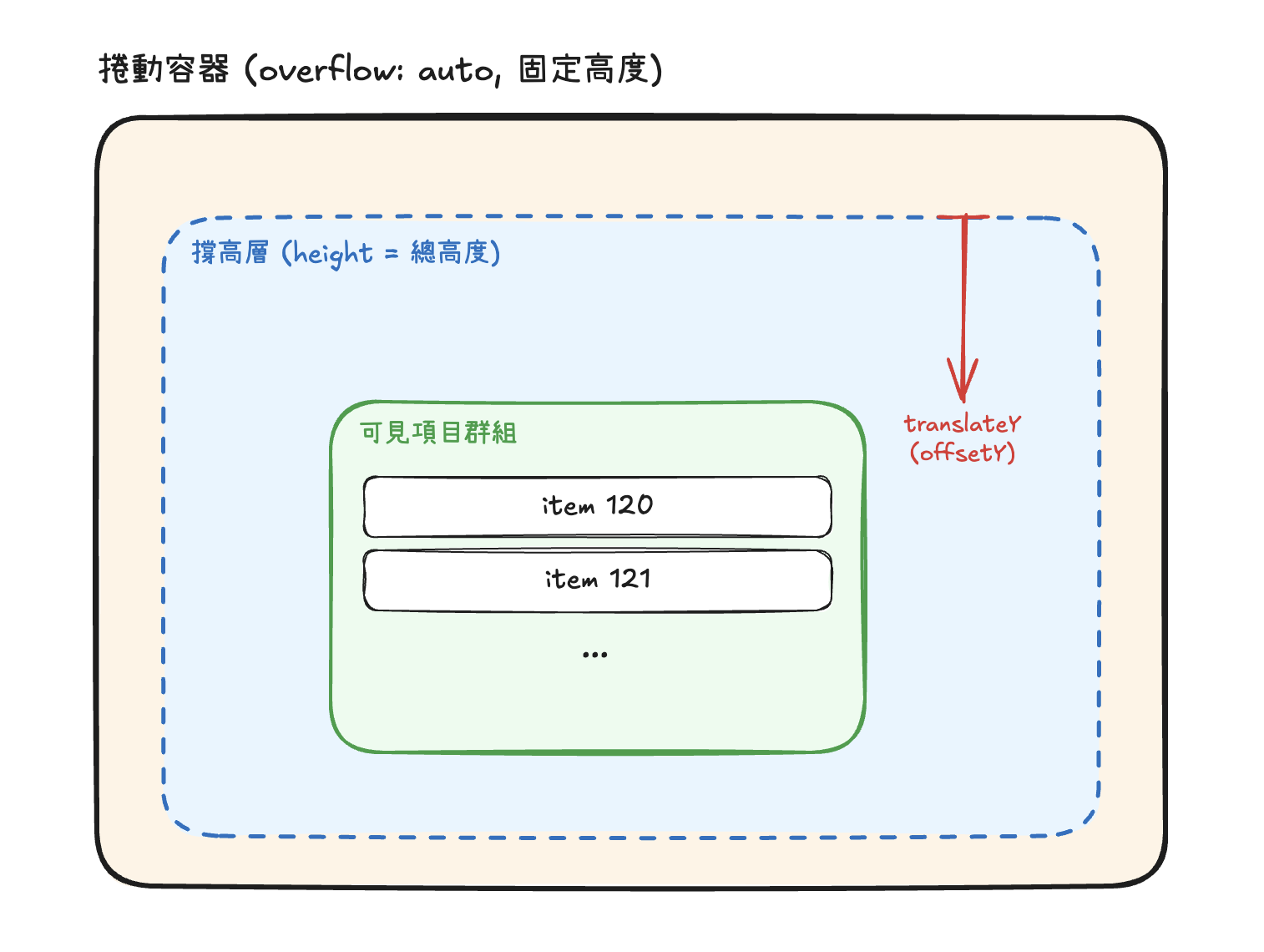
As the user scrolls, we recompute startIndex and endIndex and swap in the new batch of data. The DOM only ever holds a few dozen nodes, so whether you have 10,000 records or 1,000,000, the rendering cost stays about the same.
What If Item Heights Vary?
Fixed height is the easy case, because any item's position is just a multiplication away. Real lists are often dynamic: chat messages, comment threads, cards with content of all different lengths. Now we can't know every item's offset ahead of time, and there are a few ways to deal with that:
- Estimate first, correct after rendering: Give each item an estimated height, then measure the real height once it's rendered and record it. From then on, offset calculations use the measured values. The tradeoff is that the scrollbar length can jump slightly whenever a measurement comes in.
- Keep measuring with ResizeObserver: An item's height can change later (an image loads, a section expands or collapses), so use
ResizeObserverto watch for changes and update. - Use binary search to find the start: With varying heights,
scrollTop / itemHeightno longer works. Store each item's cumulative offset in an array, then binary search it to findstartIndex.
None of this is trivial to get right, which is why most people reach for an existing library in practice.
Existing Tools
You don't need to reinvent the wheel every time. Common choices include:
- react-window / react-virtualized: The usual picks in the React ecosystem. react-window is the lighter of the two and supports both fixed and variable-size lists and grids.
- TanStack Virtual: A framework-agnostic, headless virtualization library. It only does the calculations and leaves the rendering entirely to you, with support for React, Vue, Svelte, and more.
- vue-virtual-scroller: The Vue equivalent.
To choose, start with which framework your project uses and whether your items have dynamic heights.
The Costs and Tradeoffs
Virtualization isn't a free lunch. Think through a few things before you use it:
- Built-in browser search (Ctrl + F) stops working: Content that isn't rendered isn't in the DOM, so the browser can't find it.
- Accessibility (a11y) needs extra work: Screen readers can't see the full list, so you'll need attributes like
aria-rowcountandaria-setsizeto fill in the gaps. - It's not SEO-friendly: Search engine crawlers only see a small slice of the HTML. If the list needs to be indexed, consider pagination or server-side rendering.
- Fast scrolling can show blank space: When rendering can't keep up with scrolling, you'll get brief flashes of white. Tune your overscan and keep each item as cheap to render as you can.
- Complexity goes up: Dynamic heights, infinite loading, jumping to a specific item, and keyboard navigation are all harder than in a plain list.
So before you reach for it, ask yourself whether the data is really big enough to need it. A list of a few hundred items usually doesn't. Making each item cheaper to render, plus pagination or a "load more" button, is often enough.
Other Related Optimizations
Virtualization isn't your only option. Depending on the situation, you can combine it with these or use them instead:
- Pagination or infinite scroll: Cap how much data loads at once, which cuts down nodes at the source.
- CSS
content-visibility: auto: Lets the browser skip rendering work for off-screen elements, with no architecture change. But the nodes still exist in the DOM, so the memory cost remains, and you'll needcontain-intrinsic-sizeto give it an estimated size and avoid scrollbar jumps. - Fewer nodes per item: Flattening each item's DOM hierarchy directly reduces the total node count.
- Memoization such as
React.memo: Keeps unchanged items from re-rendering when the list updates.
Wrapping Up
Windowing boils down to rendering only what's in view: a spacer keeps the scrollbar accurate, scrollTop gives you the visible range, and you position that small slice in the right place. It turns rendering cost from proportional to the size of your data into proportional to the size of your viewport.
Just remember that virtualization has its costs: search, accessibility, SEO, and added complexity. Measure first and confirm that node count really is the bottleneck before you bring it in, rather than slapping it on every list you see.